
You scan Google results, see a description that tells you little, and move on to the next result. That's what can happen when your page has a weak meta description.
This post explains how to write a meta description, with examples for different page types, common mistakes to avoid, and instructions for adding one to your website.
1. How to Write a Meta Description (Step by Step)
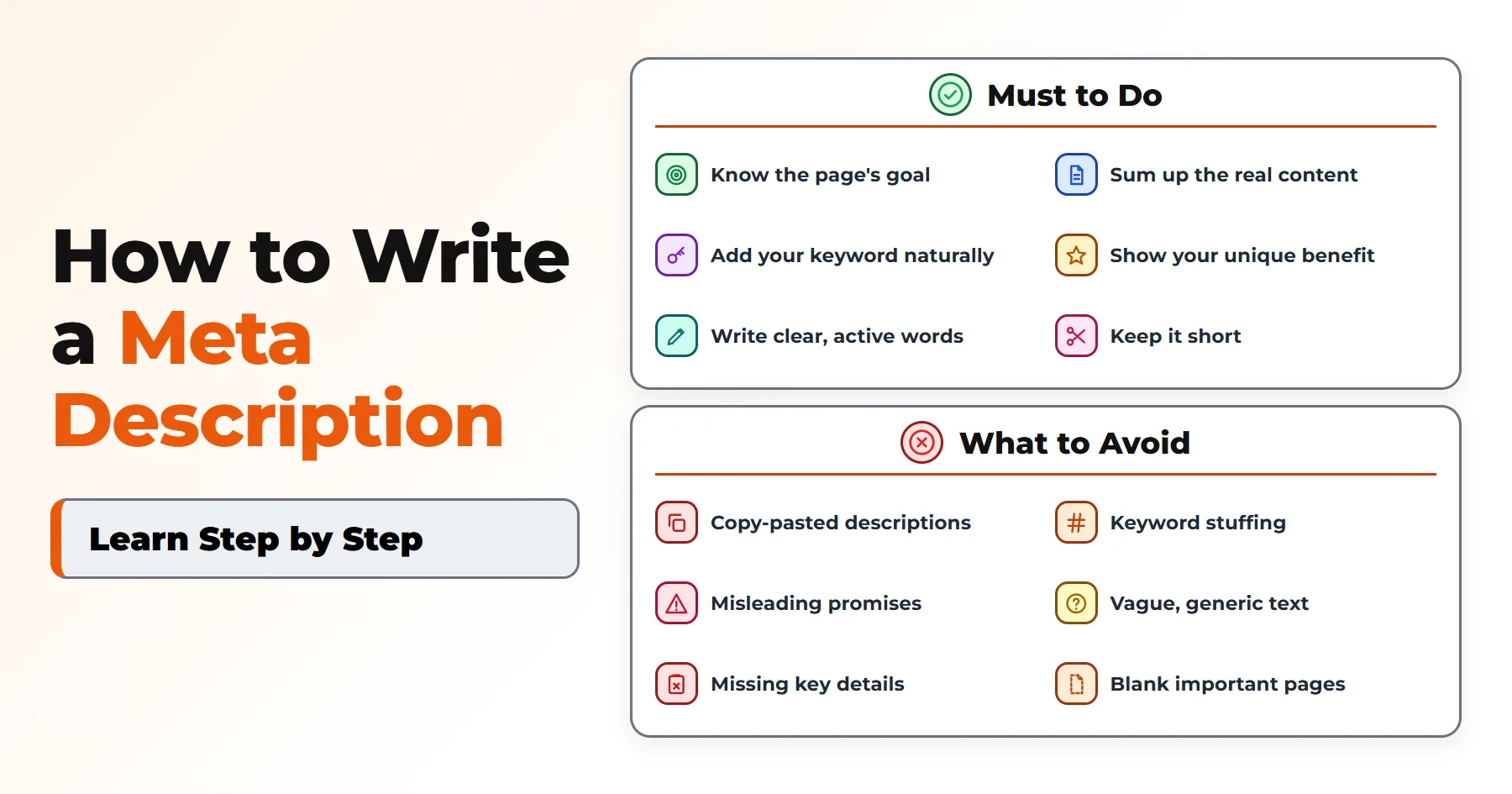
You can write a useful meta description by following these six steps.
Step 1. Understand the Page's Topic and Search Intent
First, identify what someone searching for your target keyword wants to find.
Are they looking for an answer, a tutorial, or a product?
For example, someone searching for the best mystery books wants recommendations, while someone searching for a particular novel wants information about that book.
Step 2. Summarize the Page's Actual Content
Describe what readers will find on the page. Focus on its main content rather than minor details.
For example, mention useful features such as step-by-step instructions, photos, checklists, or product details when they are actually on the page.
Step 3. Include Your Focus Keyword Naturally
Include your focus keyword in the description where it fits naturally. You can place it near the beginning or elsewhere in the sentence, depending on how the wording reads.
For example, if your focus keyword is "meta description," related terms such as "snippet" (the text shown under a result) or "search results" may also fit the context.
Step 4. Highlight a Benefit or Unique Value
Give readers a reason to choose your page over other relevant results. This could be a free template, original research, tested instructions, or a helpful video.
Step 5. Use Clear and Engaging Language
Choose familiar words and avoid complicated phrasing.
Use active voice. For example, write "Learn how to save money" instead of "Money can be saved by learning these tips."
Words like "Learn," "Compare," and "Explore" help readers understand what they can do on the page. A call to action, such as "Learn more," is optional.
Skip dramatic claims like "instant success" or "foolproof method." A clear, honest description feels more convincing.
For tips on making longer posts easier to read, see my post on blog post formatting.
Step 6. Keep Your Description Short and Clear
Remove unnecessary words and keep the main message easy to understand. Your description should communicate the page's purpose without trying to explain every detail.
2. Meta Description Examples for Different Types of Pages
Here are five examples for different types of pages. The blog post, how-to, and product page examples are made up; use their specific details only when they accurately describe your own page. The category and homepage examples come from my own website.
A good meta description is specific. It matches the page, names what readers will find, and gives a clear reason to click.
A bad one is vague. It could fit almost any page, repeats the title, and gives readers no idea what they will find.
1. Blog Post Meta Description
Page title: 10 Easy Ways to Save Money on Groceries
Bad: "Grocery tips. Read our blog for money saving ideas and more tips about groceries and food."
Good: "Grocery bills too high? Try these 10 simple ways to save money on food, from smart meal planning to store apps. Start saving this week."
2. How-To Article Meta Description
Page title: How to Change a Flat Tire
Bad: "How to change a tire. Read this article to know more about tires and cars."
Good: "Learn how to change a flat tire in about 10 minutes. Follow six simple steps with photos and get back on the road safely."
3. How to Write a Meta Description for a Product Page
Page title: TrailLite 40L Hiking Backpack
Bad: "Buy backpacks online. Best quality backpacks at low prices. Shop now."
Good: "The TrailLite 40L backpack weighs just 2.1 lbs and has a rain cover, hip belt pockets, and a padded back. Free returns within 30 days."
4. Category Page Meta Description
Page title: Website Content Writing
Bad: "Content category. Read all our posts about writing, content, and more."
Good: "Practical guides on writing website content: headlines, page text, blog posts and choosing fonts that are easy to read. Simple steps, real examples."
5. Homepage Meta Description
Page title: Website Content & Image Guides
Bad: "Welcome to our website. Find all our articles, tips, and guides here."
Good: "Short guides on image formats, alt text, fonts and clear writing for your website. Find the answer you came for, fast."

3. How Long Should a Meta Description Be?
Google doesn't have a fixed character limit for meta descriptions.
Many writers aim for around 150 to 160 characters. This is a practical guideline, not an official Google limit or a guarantee that the full description will appear.
Google may shorten a snippet to fit the width of the screen, not a set number of characters. This means mobile and desktop can show different amounts of text.
For example, a description containing wide letters such as "W" and "M" may be cut off sooner than one containing narrower letters.
Put the most important information near the beginning so the main message remains clear if the end is trimmed.
4. What to Avoid When Writing Meta Descriptions
Check your descriptions for these six common problems.
1. Writing Duplicate Meta Descriptions
Using the same description on multiple pages makes it difficult for searchers to tell them apart.
For example, imagine an online store selling 200 running shoes. If every product page uses "Shop the best running shoes at low prices. Free shipping on all orders," shoppers get no useful information about the individual products.
A description for a fictional shoe could say: "The AirStride 5 running shoe has extra heel cushioning and a wide fit for all-day comfort."
2. Stuffing Too Many Keywords
Repeating a keyword makes a description difficult to read. For example, "Meta description tips, meta description guide, meta description help" sounds unnatural.
Use the focus keyword in a sentence that makes sense to readers.
3. Writing Misleading Descriptions
Don't advertise something the page doesn't provide. For example, promising a "free download" when there is no download on the page creates a poor experience for visitors.
4. Using Vague or Generic Descriptions
A description such as "We offer great services for everyone" gives searchers no useful information about the page.
Replace broad statements with details that identify the actual subject or service.
5. Ignoring Important Information
For some pages, a small detail can affect a reader's decision. A product's important feature or an event's date, for example, may be more useful than a broad description.
6. Leaving Important Pages Without a Description
Without a meta description, Google can generate a snippet from the page's content. However, that snippet may not highlight the information you want searchers to see.
Start with descriptions for pages people are likely to find in search, such as your homepage, main articles, and key product pages.
5. Why Are Meta Descriptions Important?
A meta description can influence whether someone clicks your result or chooses another one. It gives searchers additional information when they compare pages in the search results.
However, meta descriptions are not a direct Google ranking factor. Their main value is helping people understand a result and decide whether it is relevant to them.
6. How to Add a Meta Description to Your Website
You can add a meta description with plain HTML, Yoast SEO in WordPress, or a custom PHP template.
Adding a Meta Description Using HTML
Place this tag inside the <head> section of your page:
<meta name="description" content="Learn how to write a meta description with practical tips and examples.">The name part tells browsers and search engines this is a description, while the content part holds your text.
Replace the example with a summary written for your page. For more on this tag, see MDN's page on the meta name tag.
Adding a Meta Description in WordPress Using Yoast SEO
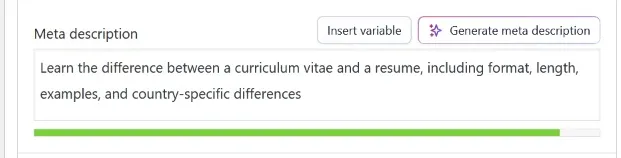
If you use WordPress with Yoast SEO, follow these steps:
- Open the post or page editor.
- Find the Yoast SEO section.
- Locate the "Meta description" field.
- Enter your description.
- Save or update the page.
Adding a Meta Description to a Custom Website
On a custom PHP website, you can get the description from your database and output it in the page template.
<?php
$desc = trim($page['meta_description'] ?? '');

if ($desc !== '') {
    $safe = htmlspecialchars(
        $desc,
        ENT_QUOTES,
        'UTF-8'
    );
    echo '<meta name="description" '
       . 'content="' . $safe . '">';
}
?>
Here is what this code does:
- It gets the description for the current page from your database.
- It outputs the tag only when a description is available.
- It uses
htmlspecialcharsso special characters don't break the HTML.
7. How to Check and Improve Your Meta Descriptions
Once your description is live, check how it looks and how people respond to it in search results.
Preview Your Meta Description
Search result preview tools show an estimate of how your title, URL, and description may appear in Google. Yoast SEO includes a built-in Google preview, and Mangools offers a free SERP Simulator.
Review Performance in Google Search Console
Google Search Console provides performance data for your pages. To review it:
- Open the Performance report.
- Select the Pages tab.
- Review the clicks, impressions, and CTR for individual pages.
CTR stands for click-through rate. It measures how often people click your result after seeing it.
Look for pages with many impressions but a fairly low CTR. Compare their average positions and search queries before deciding whether to revise their descriptions.
A low CTR for a result near the bottom of the first page may be less concerning than one for a result near the top.
After making a change, give Google time to visit the page again and collect enough new data before you check the result.
8. Meta Description vs. Search Snippet
A meta description is the summary you add to a webpage's HTML. A search snippet is the text that a search engine displays for that page in its results.
Google builds snippets mainly from the page’s content. It sometimes uses your meta description when it describes the page better.
Where Does a Meta Description Appear?
When Google uses your meta description, it generally appears below the title link in the search result. A typical result includes:
- Title: the clickable link to the page.
- URL: the webpage address.
- Description (snippet): the short text displayed beneath the title.
9. Frequently Asked Questions About Meta Descriptions
1. Do I Need to Add a Meta Description to Blog Categories and Tags?
It depends on whether you want those pages to appear in search results. Category pages often do, so a short, clear description helps readers know what they will find.
Tag pages are different. They often repeat the same posts, so many sites choose not to show them in search at all. If you do want a tag page to rank, give it its own description.
2. Can I Write Meta Descriptions Automatically?
Yes, but with care. On a large site, such as a store with thousands of products, writing every description by hand is not realistic.
Automatic descriptions can work if each one is easy to read and specific to its page. Avoid keyword lists or text that says the same thing on every page. After setting it up, read a few results to make sure they sound natural.
3. Should My Meta Description Repeat My Page Title?
No. Your title and your description do different jobs. The title names the page. The description adds details the title can't fit, such as what readers will get from the page.
If you repeat the title, you waste space and give searchers nothing new.
If you want ideas for strong titles, see my post on blog title examples.
Final Thoughts
Now you know how to write a meta description that gives readers specific, relevant information instead of exaggerated promises. Write it for the person deciding whether your page is worth visiting.
Writing one also makes you answer a simple question: what is this page really for? If you can’t say it in two short sentences, the page itself may need work. Go through your most important pages and check whether their descriptions give readers a good reason to click.